> For the complete documentation index, see [llms.txt](https://support.lunchmoney.app/llms.txt). Markdown versions of documentation pages are available by appending `.md` to page URLs; this page is available as [Markdown](https://support.lunchmoney.app/miscellaneous/unlimited-budget-accounts.md).
# Unlimited Budget Accounts
Lunch Money supports unlimited budget accounts per subscription!
You can create additional budgets to track different aspects of your life, collaborate with others and even use as a developer sandbox account! The possibilities, like your budgets, are limitless.
## How do I create a new budget account?
On the web app, locate the teal circle to the left of the "Logout" button:
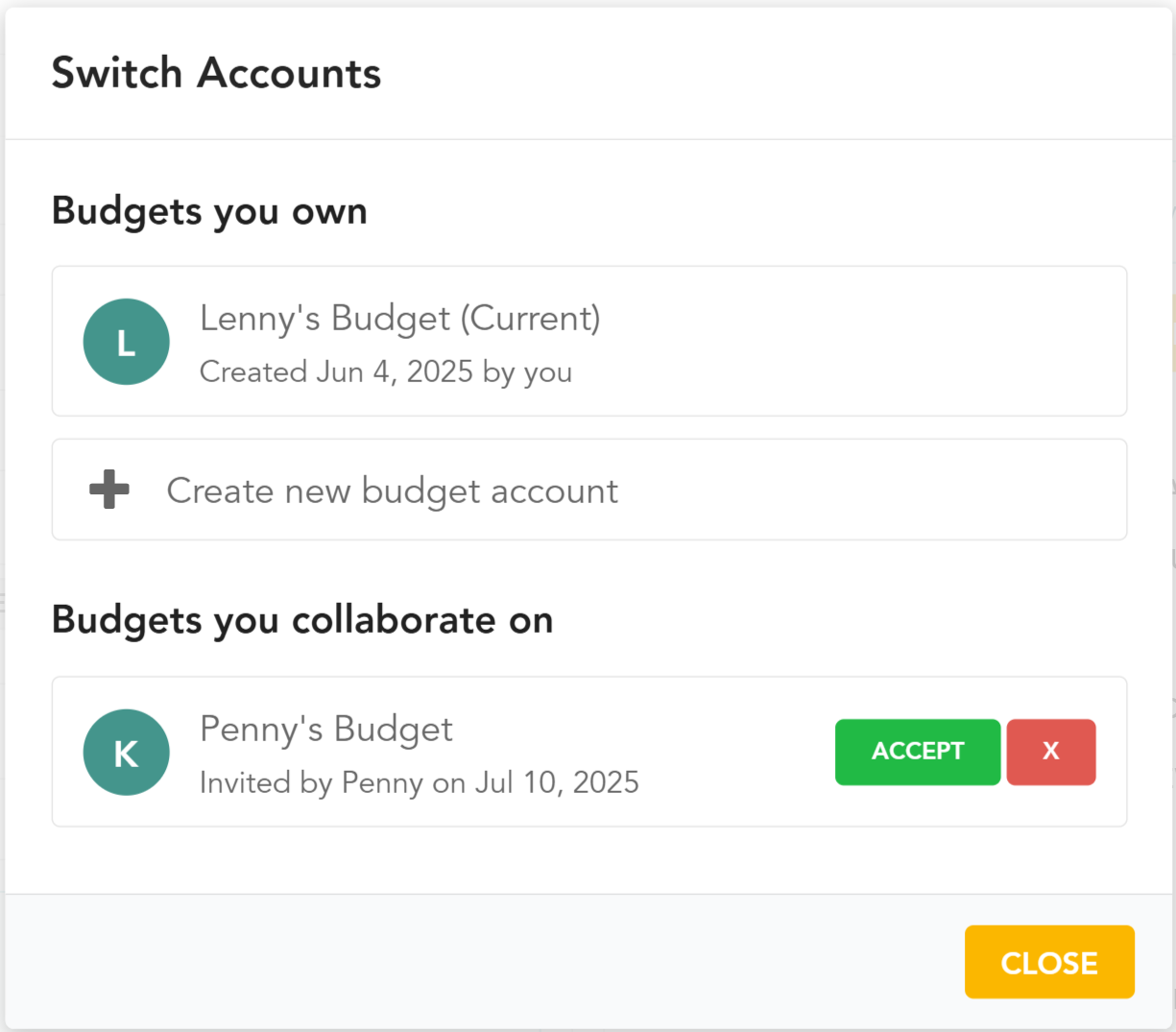
This will invoke the "Switch Accounts" pop-up wherein you can view all your budget accounts and create new ones. You will also find any pending invitations to [collaborate](/settings/collaborators.md) on existing budgets here:
## What are some use cases for creating multiple budget accounts?
Some users find it helpful to separate budget accounts by different aspects of their life. For example, you may have your own personal budget, a shared budget with a partner and a budget for your business.
Some developers may also find it useful to create a separate budget account as a developer sandbox account!
## How does collaborating with others work?
Each budget account has one admin user whose paid subscription supports the budget account. Once this budget account is created, they can invite unlimited collaborators to this account.
A budget account is an isolated budget with its own transactions, accounts, categories, tags, etc, and its data cannot be accessed by another budget account.
A user who is only collaborating on other users' budget accounts does not need their own paid subscription. At any time, collaborators may create their own budget, thereby becoming an admin user and requiring a paid subscription. A collaborator who creates their first budget automatically receives a free 14-day trial.
To learn more about collaborators, [click here](/settings/collaborators.md).
---
# Agent Instructions
This documentation is published with GitBook. GitBook is the documentation platform designed so that both humans and AI agents can read, navigate, and reason over technical content effectively. Learn more at gitbook.com.
## Querying This Documentation
If you need additional information that is not directly available in this page, you can query the documentation dynamically by asking a question.
Perform an HTTP GET request on the current page URL with the `ask` query parameter, and the optional `goal` query parameter:
```
GET https://support.lunchmoney.app/miscellaneous/unlimited-budget-accounts.md?ask=&goal=
```
`ask` is the immediate question: it should be specific, self-contained, and written in natural language.
`goal` is optional and describes the broader end goal you are ultimately trying to accomplish on behalf of the user. GitBook uses it to tailor the answer towards what is most useful for that goal.
The response will contain a direct answer to the question and relevant excerpts and sources from the documentation.
Use this mechanism when the answer is not explicitly present in the current page, you need clarification or additional context, or you want to retrieve related documentation sections.